
How Account Deletion Works in the Megazone App
If you decide to delete your account on the Megazone app, here’s a simple step-by-step guide to help you through the process:
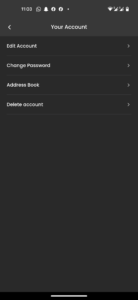
Navigate to Account Deletion:
- Log in to your Megazone account.
- Go to the Profile screen.
- Select My Account, then proceed to Delete Account.
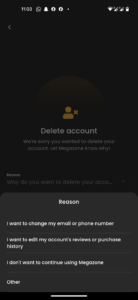
Step 1: Choose a Reason for Deletion
- You’ll be prompted to select a reason for deleting your account from a provided list.
Step 2: Review Deletion Information
- The next screen will display the details that will be permanently deleted.
- You’ll also be informed if any of this data can be recovered.
Step 3: Confirm Deletion
- To proceed, check the confirmation box to finalize your decision.
Step 4: OTP Verification
- Enter the One-Time Password (OTP) sent to your registered email or phone number to verify and complete the account deletion process.
Your account will be successfully deleted after verification. If you have any issues, contact Megazone Support for assistance.
Request to Delete User Data
If you wish to request the deletion of your personal data, please visit our Contact Us page. Fill out the form with your details and specify your request for data deletion. Our team will review your request and process it in accordance with our privacy policy.
For any queries or further assistance, feel free to reach out to us directly. Your privacy is our top priority!